
Windows Server 2016 End of Life

Support Ends January 12, 2027

Windows Server 2016: What You Need to Know

Microsoft Will End All Support for Windows Server 2016 on January 12, 2027 

After this date, systems running Server 2016 will no longer receive security updates, patches, or technical support.

If Server 2016 is still part of your environment, now is the right time to plan your transition so you can stay secure, compliant, and supported without last‑minute disruption.

Reference: Windows Server 2016 – Microsoft Lifecycle

What End of Life Means for Your Organization 

Once Server 2016 reaches End of Life, Microsoft will no longer provide:

    • Security patches for new vulnerabilities
    • Bug fixes or reliability updates
    • Compliance‑related updates
    • Technical support

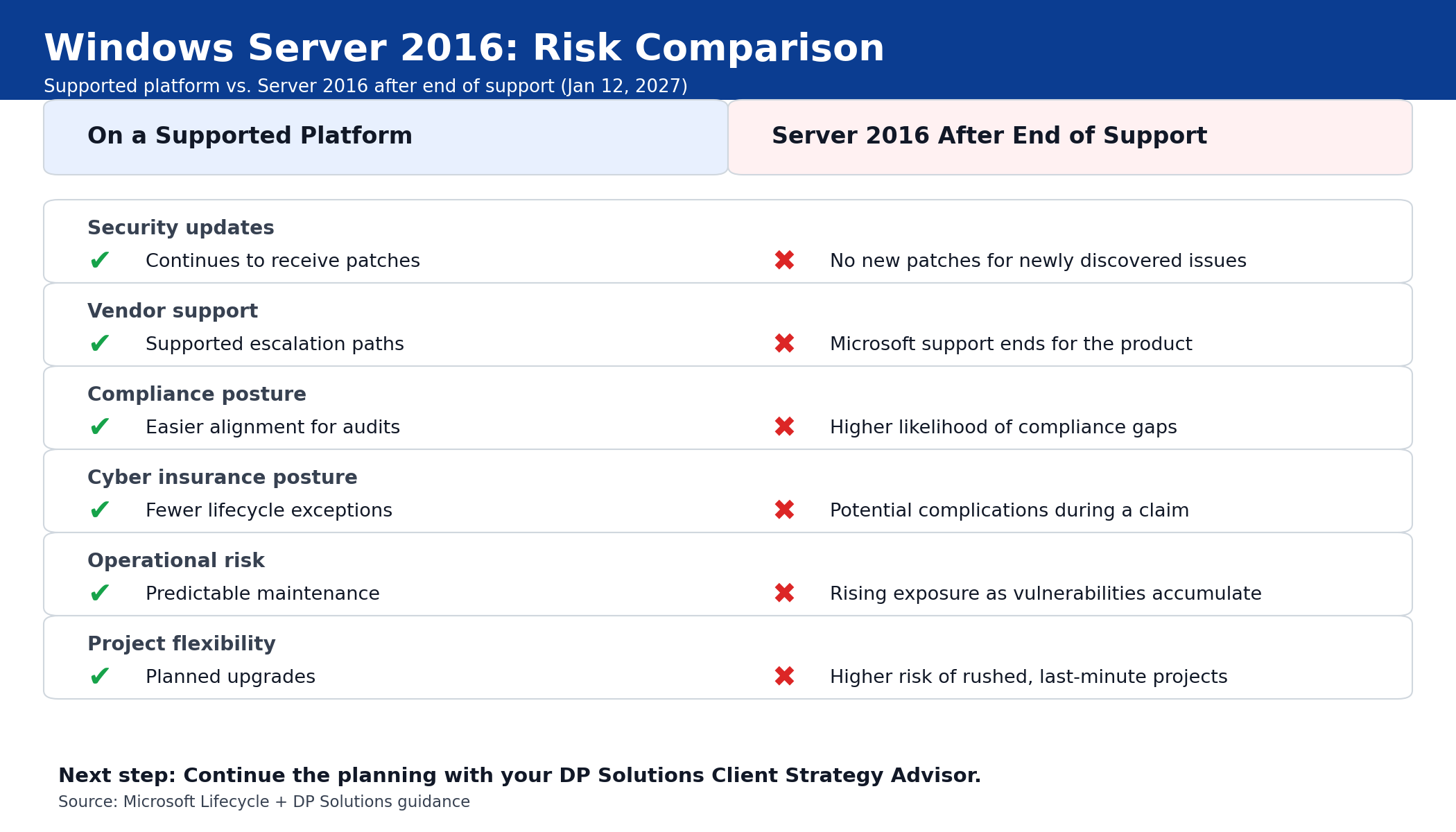
Running unsupported infrastructure increases risk over time and limits your ability to respond to new threats.

Reference: Microsoft Lifecycle Policy
server2016_risk_comparison

Security & Compliance Risks

Organizations that continue running Server 2016 after January 2027 may face:

    • Increased exposure to ransomware and cyberattacks
    • Higher likelihood of data breaches
    • Compliance gaps (SOC 2, HIPAA, PCI, and others)
    • Potential issues with cyber insurance coverage or claims

Planning early allows you to reduce risk in a controlled, strategic way.

Your Options for Moving Forward

There is no one‑size‑fits‑all approach. Common paths include:

  • Upgrade to a Supported Windows Server Version
    Best for organizations that want to modernize while keeping workloads on‑premises.

  • Move to Azure or a Hybrid Cloud Model
    Ideal for scalability, flexibility, and long‑term platform support.

  • Modernize Applications
    Use the transition to update or retire legacy applications that may already be limiting performance or security.

Your Client Strategy Advisor will help you evaluate which option best fits your environment, business goals, and timeline.
Server 2016 Timeline

Why Starting Early Matters

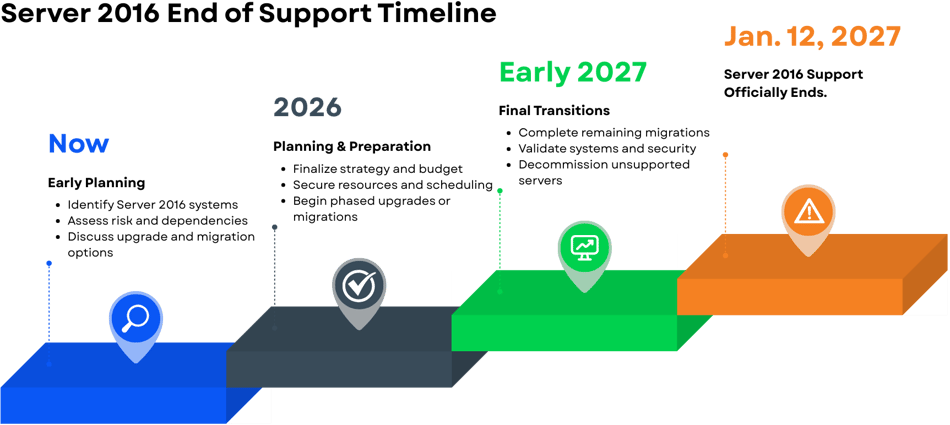
As the 2027 deadline approaches, many organizations will be planning migrations at the same time. This often leads to:

    • Limited engineering availability
    • Longer lead times for hardware and infrastructure
    • Tighter project schedules
    • Increased risk of rushed, higher‑cost projects

Starting early gives you more flexibility, better options, and a smoother transition.

 
How DP Solutions Supports You

We partner with clients throughout the entire planning and transition process, including:

    • Identifying where Server 2016 exists in your environment
    • Assessing security, compliance, and operational risk
    • Reviewing upgrade and migration options
    • Building a realistic, phased timeline
    • Supporting execution when you’re ready to move forward


Next Step: Continue the Planning

If Server 2016 is still part of your environment, the most important step is starting early.

Let’s continue the planning and align on the right path forward for your systems, security requirements, and timeline.

👉 Contact us to take the next step.
 

Frequently Asked Questions

Answers to common questions about Windows Server 2016, timing, and next steps

Can we wait until closer to 2027?

You can, but waiting increases risk. As the deadline approaches, resource availability tightens, timelines compress, and projects become more disruptive and costly. Starting early gives you more control and flexibility.

Is extended support available?

Microsoft does not provide free extended support for Server 2016. Any stopgap options are limited, costly, and temporary, and they do not eliminate long‑term risk.

How long does a migration take?

Timelines vary based on environment size, complexity, and dependencies. That’s why early assessment and planning are critical.

Do we have to move to the cloud?

No. Some organizations upgrade on‑premises, others move to cloud or hybrid models. The right choice depends on your goals, workloads, and risk tolerance.

Our expert technicians provide network consulting services to create an IT strategy that corrects your current issues and future-proofs your network infrastructure to achieve long-term security and optimal performance.