
The Hidden Costs of Doing Nothing: Why Outdated Infrastructure Will Hurt More Than Upgrading


Organizations rarely set out to “do nothing.”
But when budgets are tight, teams are stretched thin, and systems seem stable enough, delaying upgrades becomes the path of least resistance.
Unfortunately, in today’s environment, doing nothing has become the most expensive IT strategy of all.
Whether it’s an aging firewall, an outdated endpoint, a legacy application, or a server running on borrowed time, the longer you wait to modernize, the more risk, cost, and disruption you accumulate. And with major deadlines approaching, like the end of support for Windows Server 2016 in January 2027, businesses are realizing that staying still actually moves you backward.
The Snowball Effect of Outdated Infrastructure
Most organizations think of aging systems as an inconvenience. In reality, outdated devices and unsupported platforms create a chain reaction that grows over time:
Downtime and reliability issues
Older systems fail more often. They’re less stable, harder to troubleshoot, and take longer to repair because parts, patches, and vendor support are limited or gone entirely.
Security exposure and higher cyber risk
Unsupported platforms don’t receive critical security updates, making them an easy target for ransomware and modern attack methods.
Compliance gaps
Auditors now look closely at unsupported hardware and software because they directly increase breach likelihood. Many frameworks view outdated infrastructure as a red flag for internal controls.
Cyber insurance complications
Applications and claims reviews now ask whether all systems are supported and patched. Running outdated platforms can affect coverage eligibility or payouts.
Vendor compatibility problems
Vendors eventually stop supporting older OS versions, leaving organizations stuck on legacy tools that slow down operations.
The snowball always rolls downhill, and the later you address it, the bigger and more expensive it becomes.
Real-World Scenarios: How Delays Become Costly
These examples illustrate just how fast “we’ll get to it later” can turn into surprise expenses and operational headaches.
Scenario 1: The sudden failure
A business waits to replace aging hardware until “next year’s budget.” One morning, the server won’t boot. Now it’s an emergency project with rush costs, data recovery fees, overtime hours, and downtime that stalls productivity across the organization.
Scenario 2: The cyber insurance denial
A company submits a claim after a ransomware attempt. The insurer reviews the environment and points to unsupported software that had known vulnerabilities and denies coverage.
Scenario 3: The compliance audit finding
During a SOC 2 or HIPAA audit, unsupported systems trigger a deficiency. Remediation becomes urgent and costly, and renewal is delayed until the issue is fully resolved.
These aren’t dramatic worst‑case scenarios. They’re outcomes that companies across industries experience every year.

A Cost Comparison: Waiting vs Planning Ahead
Waiting feels cheaper, but only in the same way skipping oil changes feels cheaper.
In both cases, the bill eventually comes, and it’s rarely small.
When you wait, costs tend to show up as:
- Emergency hardware purchases
- Higher project labor costs
- Unplanned downtime and lost productivity
- Higher cyber incident likelihood
- Compliance-related remediation fees
- Increased licensing costs due to compressed timelines
- Loss of bargaining power with vendors
When you plan, costs tend to be:
- Predictable
- Phased
- Budgeted over several quarters
- Aligned with business goals
- Less disruptive to teams and operations
Strategic planning isn’t just the safer path; it’s the cost‑effective one.
Server 2016 EOL: A Perfect Example of Why Early Action Matters
The end of support for Windows Server 2016 on January 12, 2027 is a great example of how deadlines sneak up on organizations, even when they’re announced years in advance.
As 2027 approaches, more companies will begin planning migrations at the same time, which often leads to:
- Longer project lead times
- Limited engineering availability
- Rushed or more expensive upgrades
- Delays in hardware procurement
Rather than repeating technical details, your organization can explore the full breakdown here:
https://www.dpsolutions.com/server-2016-end-of-life
Using end of life (EOL) timelines as anchors in your roadmap helps prevent last‑minute fire drills.
What a Readiness Plan or IT Roadmap Should Look Like
A strong IT roadmap will not only map out hardware refreshes but will also align your technology needs to business goals, growth plans, compliance requirements, and risk tolerance.
Here’s an example of a clear, actionable 12–18 month readiness plan:
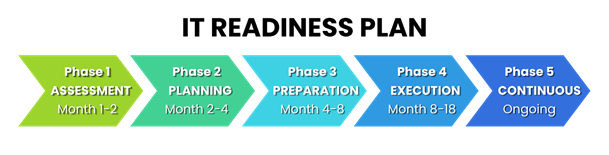
Phase 1: Assessment and Inventory (Month 1–2)
- Identify all outdated hardware, operating systems, and applications
- Determine support status, lifecycle timelines, and vendor dependencies
- Assess security, compliance, and insurance exposure
- Map system interdependencies
- Prioritize based on risk and business impact
Phase 2: Strategic Planning (Month 2–4)
- Decide which systems should be upgraded, replaced, migrated, or retired
- Evaluate cloud vs on‑prem vs hybrid options
- Build a budget forecast for the next 1–3 years
- Create a phased schedule that minimizes downtime and disruption
- Align roadmap with leadership, finance, and IT teams
Phase 3: Pre‑Migration Prep (Month 4–8)
- Procure hardware or licensing
- Prepare documentation and technical requirements
- Plan testing environments
- Address application compatibility and vendor requirements
Phase 4: Execution (Month 8–18)
- Complete upgrades or migrations in prioritized waves
- Validate systems and security controls
- Update documentation, diagrams, and disaster recovery plans
Phase 5: Continuous Review (Ongoing)
- Quarterly roadmap check-ins
- Annual lifecycle and risk reassessments
- Adjust plans based on growth, compliance shifts, and new threats
Final Thoughts: The Cost of Doing Nothing Is Too High
Outdated systems don’t just create technical challenges, they create financial, compliance, and operational risk that grows with time.
A thoughtful roadmap gives your organization stability, predictability, and confidence.
If you want long‑term clarity, fewer emergencies, and a real strategy instead of reacting to every new deadline, the next step is simple.
Build Your IT Roadmap
If you’re ready to get ahead of deadlines and modernize on your terms, we can help you build a roadmap that fits your business, budget, and timeline.
Reach out to us and let’s start planning today.
Frequently Asked Questions (FAQ)
1. What are the risks of outdated IT infrastructure?
Outdated infrastructure increases downtime, security vulnerabilities, compliance risks, and can lead to higher long-term costs due to emergency fixes and inefficiencies.
2. How does outdated software affect cybersecurity?
Unsupported software no longer receives security updates, making it a primary target for ransomware, data breaches, and modern cyberattacks.
3. Why does outdated infrastructure impact compliance?
Many frameworks like SOC 2 and HIPAA require supported and secure systems. Outdated technology is often flagged as a control failure during audits.
4. How does aging infrastructure affect cyber insurance coverage?
Cyber insurance providers often require systems to be patched and supported. If outdated systems are involved in an incident, claims may be denied or reduced.
5. When should you upgrade or replace IT systems?
Organizations should evaluate systems regularly and plan upgrades before they reach end-of-life to avoid downtime, security risks, and costly emergency projects.
6. What happens when Windows Server 2016 reaches end of life?
When Windows Server 2016 reaches end of life on January 12, 2027, Microsoft will stop providing security updates, patches, and support. This increases cybersecurity risk, creates compliance challenges, and may affect cyber insurance coverage, making it critical to plan upgrades or migrations in advance.
Comments